> For the complete documentation index, see [llms.txt](https://knowledge.maica.com.au/maica-knowledge-base/llms.txt). Markdown versions of documentation pages are available by appending `.md` to page URLs; this page is available as [Markdown](https://knowledge.maica.com.au/maica-knowledge-base/maica-administration-guide/support-at-home/care-management-budget-sync.md).
# Care Management Budget Sync
Learn about Maica's Care Management Budget Sync function and logic.
Maica supports real-time synchronisation of Care Management Budget Data for Aged Care providers under the Support at Home initiative. This feature ensures accurate visibility of pooled Care Management funds as reported by Services Australia. To learn how Maica supports the Sync, please refer to the detailed sections below.
## What Is the Care Management Budget Sync?
Care Management budgets are pooled at the provider level rather than allocated per Participant. The Budget Sync functionality allows providers to retrieve current financial data directly from Services Australia via API, ensuring that all budget information used for planning and reporting reflects the latest available data.
{% hint style="success" %}
Under Support at Home, Care Management budgets are associated with a **Service Provider ID**. Where an organisation operates multiple Service Provider IDs, Care Management budgets are retrieved and displayed **per Service Provider ID**, rather than as a single aggregated budget.
{% endhint %}
## How do I run the Sync?
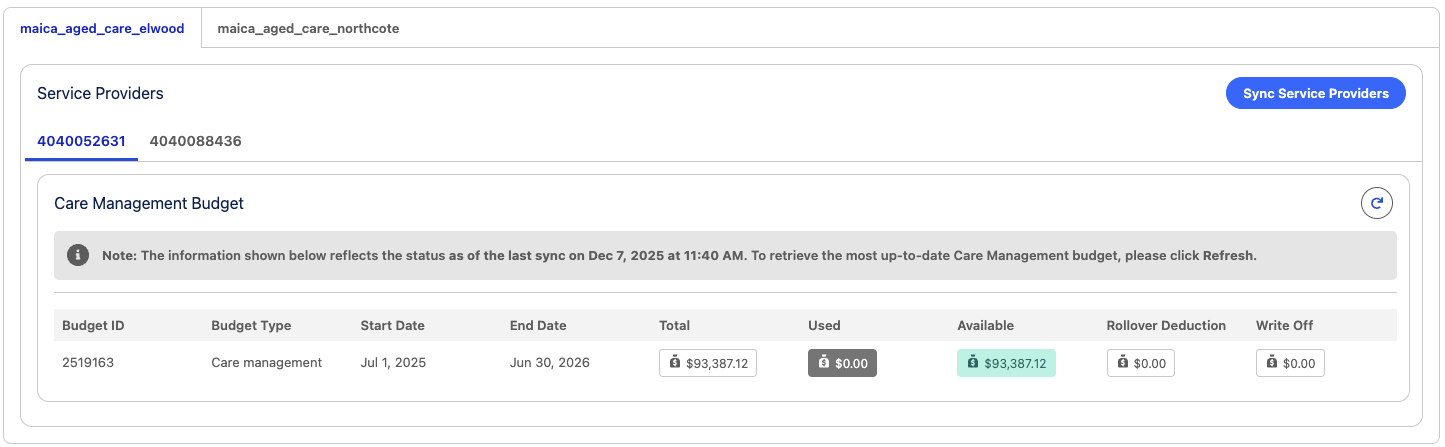
Firstly, to access the Care Management Budget Sync, navigate to **Settings >** [**Support at Home**](/maica-knowledge-base/maica-administration-guide/settings/support-at-home.md). You’ll see a **Care Management Budget** component that shows the current budget data and allows manual synchronisation.
Then, follow these steps to sync the Care Management Budget:
#### 1. Populate the Service Provider ID
Each Care Management Budget is associated with a Service Provider ID. This ID is required to authenticate with Services Australia and trigger the sync process. Use the **Sync Service Providers** action to populate your Service Provider ID(s).
When using the **Sync Service Providers** action, Maica retrieves Care Recipient budget data, identifies the Service Provider IDs returned by Services Australia, and store each distinct Provider ID so it appears as its own tab.
{% hint style="info" %}
Note, y*ou will only be able to proceed once a valid Service Provider ID has been detected.*
{% endhint %}
Sync Services Provider Logic
1. Perform a **callout** to retrieve **all Care Recipient budgets**.
2. Parse the returned payload to identify **Service Provider IDs** per Care Recipient.
3. **Update the Care Recipient (Contact)** with the relevant **Service Provider ID** value.
4. **Store** the distinct Service Provider IDs so they can be displayed as **tabs** within the existing tabbed card UI (using the Provider ID as the tab name).
5. Optionally (as part of the same run), **populate the existing “Service Provider ID” input** on the selected tab (so the tab reflects the stored provider ID).
If your organisation operates **multiple Service Provider IDs**, each Provider ID is displayed as a **separate tab** within the Care Management Budget component. Selecting a tab determines which Service Provider ID is used for the sync and which Care Management budget data is displayed.
#### 2. Click the Refresh Button
Click the **Refresh** icon on the top-right of the component to trigger a new sync. This will query Services Australia for the most recent budget data for the current financial quarter.
## Interpreting the Display
Once synced, the Care Management Budget component will show:
* A table of all **active Care Management budgets** per Service Provider ID.
* **Budget metrics**:
* **Total** – Total amount reported for the financial quarter.
* **Used** – Amount already spent.
* **Available** – Funds remaining.
* **Rollover Deduction** - Amount deducted from the current quarter to offset funds rolled over from the previous period. This value represents adjustments applied to ensure the available balance reflects true current-period funding.
* **Write Off** - Amount removed from the budget where unspent or unrecoverable funds have been written off by Services Australia. This value ensures the remaining total aligns with the approved financial record.
* The **Last Sync Date** shown in the info banner to indicate the currency of the data.
This display is shown below:
{% hint style="info" %}
This data is provided directly by Services Australia. If budget data does not appear as expected, verify that your Service Provider ID is correct and try syncing again.
{% endhint %}
## What Happens During Sync?
Behind the scenes, Maica:
* Calls the **Services Australia API** using the entered Service Provider ID.
* Filters the returned data using the following logic:
* `Budget Type = Care Management`
* `Budget Date Range = Current Financial Quarter`
* Displays all valid results in a sortable table.
* Optionally allows saving the result, including the **Last Sync Date**
Maica also retrieves Care Recipient budget payloads to **identify all Service Provider IDs in use**, stores them, and display them as tabs within the Care Management Budget component. This ensures Care Management budgets are always attributed to the correct Service Provider context.
{% hint style="success" %}
Additionally, when a Support at Home budget is retrieved, Maica captures the **serviceProviderId** from the budget payload and saves it to a new field on the **Contact** record. This ensures the Services Australia provider associated with the Care Recipient is persistently recorded in Maica.
{% endhint %}
## Participant Roles and Permissions
The sync process and budget view are intended for **Service Provider Administrators** or users with **configuration-level access** only. General end users, such as Care Workers, do not interact with this section.
## FAQs
What is the purpose of this sync?
It provides up-to-date visibility of pooled Care Management funds to improve operational and financial management.
Can I see budgets from past quarters?
Currently, only the current quarter’s budget is retrieved and displayed. Historical storage is not implemented in this phase.
Is this data stored permanently?
Only if explicitly saved by the user. Otherwise, the information is parsed and displayed temporarily.
Can the sync return multiple records?
Yes. Maica can handle and display multiple Care Management budget entries, sorted by start date.